> For the complete documentation index, see [llms.txt](https://nexas-ridewiz.gitbook.io/myagents.plus/llms.txt). Markdown versions of documentation pages are available by appending `.md` to page URLs; this page is available as [Markdown](https://nexas-ridewiz.gitbook.io/myagents.plus/product-development/development/saas-experience-archive/...more-apps+-dev-archive/b2bc+/buyer-agents-and-affiliates.md).
# Buyer Agents and Affiliates
Bulk-Buyer. Sales Agent. Affiliate.
> ## Bulk `Buyer`
## *`New!`*
> ## Sales `Agents`
* Agent Dashboard with Login – Dedicated Area for Agents
* Agents Shop & Place Orders For Customers
* Agents Earn Commissions – Advanced Commission Structure
* Fixed or Percentage Commissions, by Customer / Agent / Product with Conditions (e.g. commission for only the first 10 orders of a customer)
* Announcements for Publishing Info, News, Posts for Agents
* Messaging System for Queries & Communication
* Powerful Admin Backend with Insight into Agents & Earnings
* Agents can Negotiate, Offer Discounts & Edit Prices
* Agents can Increase Prices & Get up to 100% Commission on the Difference
* Agents can Create & Share Coupons
* Affiliate Links for Registration, Shopping, Products
* Customers Can Choose or Be Automatically Assigned an Agent at Registration
* Earnings System with Dashboard, Charts, Reports
* Payouts System with History, Bonuses, Payout Methods
* Agents can Manage Orders assigned to them
* Subagents (Teams) – Agents can Recruit Subagents and Earn Commissions
* Agents can Create & Share Shopping Carts via Links
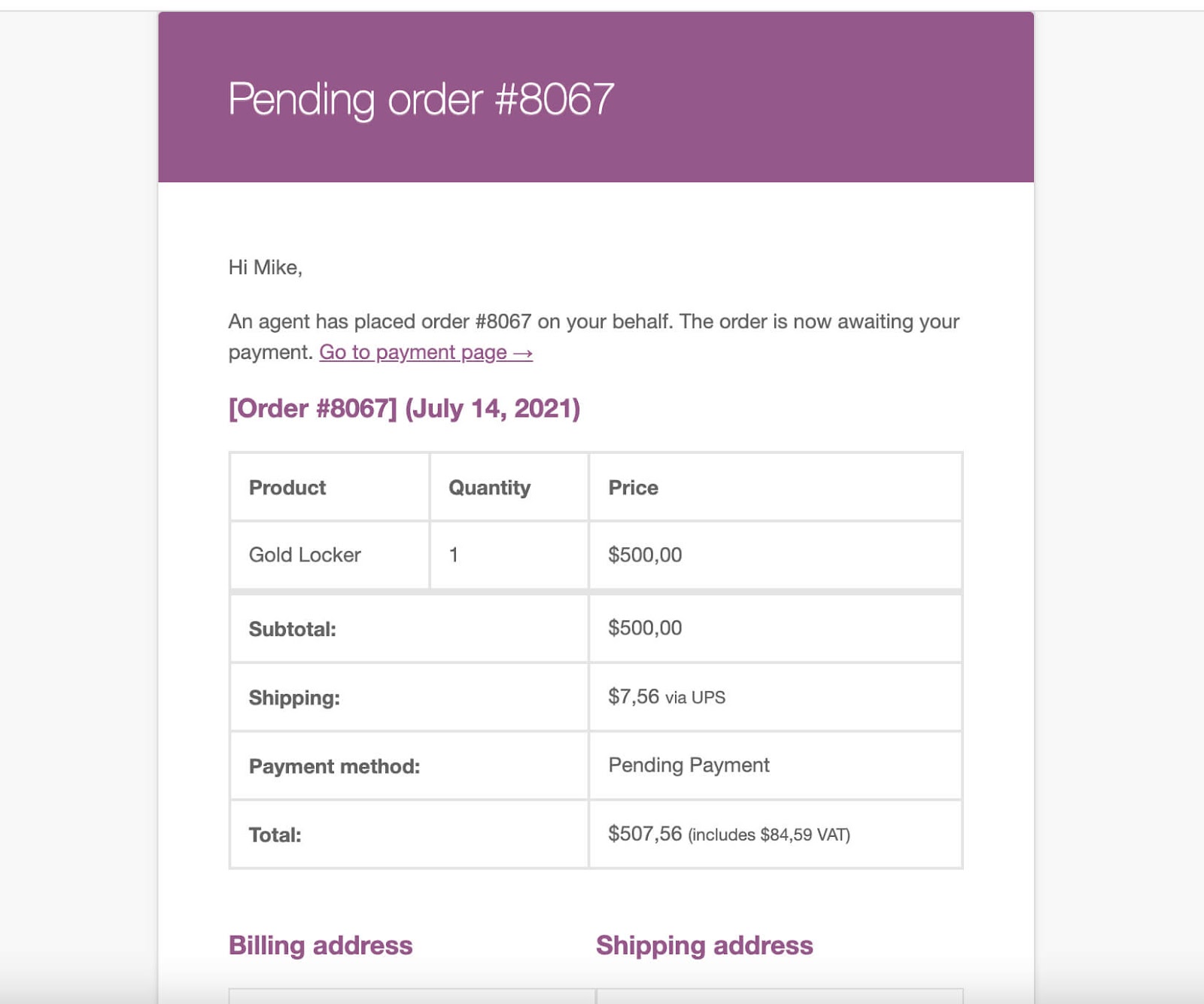
* Pending Payments: Agents Order, Customers Receive Email with Payment Link
* Email Notifications for Messages, Payouts, Pending Payments, etc.
### Features in More Detail
✔ Powerful Agent Dashboard
* Dashboard with 12 panels (most can be disabled)
* Panels for announcements, messages, coupons, cart sharing, affiliate links
* Panels for
* Customers
* Orders
* my team (subagents)
* Earnings
* Payouts
* Profile
* Overview of
* Balance
* latest earnings
* order stats
* pending messages
✔ Announcements
* Admin can send announcements and configure their visibility by group or sales agent(s)
* Announcements are posts that support formatting
* Agents can receive announcements by email, based on profile settings
* Agents view announcements in dashboard
## *`New!`*
✔ Messages
* Messages allow admin and agents to easily communicate
* Both admin and agents can send messages and initiate conversations
* Messages can be received by email, based on profile settings
* Conversations can be marked as read, or closed
✔ Coupons
* Agents can create / delete coupons and define coupon limits
* Admin can set Maximum available discount by group or by agent
* Agents can configure usage limits, and expiry dates
* Agents can configure minimum and maximum spend limits
* Agents earn commissions when coupons are used
## *`New!`*
✔ Cart Sharing
* Agents can add items to cart, and create sharable links
* Links can be shared with customers, and set the cart when used
* Agents receive commissions when their links are used
✔ Affiliate Links
* Agents can share registration, product, and shopping affiliate links
* When registration links are used, the customer is assigned to the agent
* When shopping or product links are used, the order and commission is assigned to the agent
* Customers can choose agent at registration by entering Agent ID
✔ Customer Management
* Agents can view all their customers in dedicated panel
* Agents can add new customers. Customers receive login info via email.
* Agents can view, print, or download agent data (PDF / CSV)
✔ Order Management
* Agents can view and manage orders assigned to them (optional feature)
* Agents have backend access only for the specific orders assigned
* Agents can mark orders as complete, send invoices, etc.
* Agents can view, print or download order data (PDF / CSV)
✔ Subagents – Teams
* Agents can add subagents, who receive credentials by email
* Agents receive commissions for their subagents’ sales
* List of subagents can be printed or downloaded (PDF / CSV)
✔ Earnings
* In the dashboard, agents can view their earnings and monthly charts and stats
* Agents can view both direct earnings, and earnings of subagents
* Earnings are marked as “Pending” until orders are completed
* Agents have a Balance, that is reduced when payouts are sent
* Admin can edit commissions (Earnings) on each order
* Admin can view each agent’s earnings in the backen
✔ Payouts
* Admin can enter payouts in the backend
* Emails regarding payouts are sent to agents
* Agent balance is reduced when payouts are sent
* Admin can configure payout methods in settings, and agents choose one
* Payout history can be viewed at all times by both agent and admin
* Our system does not send actual money, it only tracks payouts for you.
✔ Agent Groups
* Organize agents into groups, and set options by group
* Different commission plans by group
* Different maximum discount percentage by group
* Announcement visibility by group
✔ Group Rules (Promotions)
* Promote agents from one group to another when they reach thresholds
* Change group based on earnings reached, or total sales reached
* Group changes are automatic when thresholds are met
Example: An agent can be in the VIP group (10% commission), until they hit $100,000 in earnings, at which point they are moved to the VIP 2 group, where they receive 15% commission.
✔ Shop as Customer Functionality
* Agents can switch to the customer’s account and add items to cart
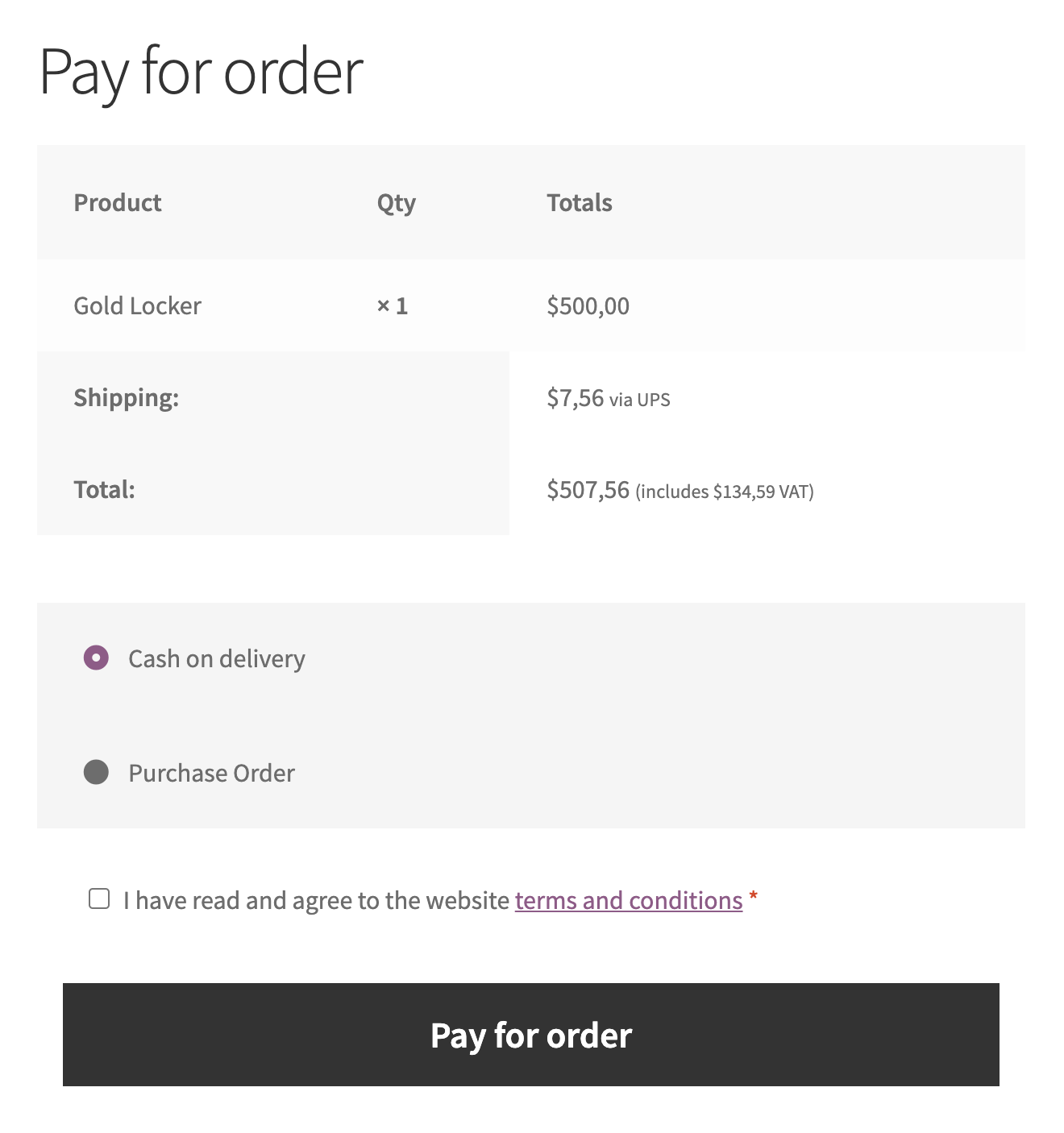
* At checkout, agents can pay, OR choose the “Pending Payment” gateway
* When agents choose “pending”, customers receive an email notification
* Customers can click on a single link and go pay for the order
✔ Price Negotiation & Edit Prices in Cart
* When agents shop for the customer, agents can negotiate / edit prices (optional)
* Agents can offer discounts depending on “maximum discount percentage”
* Agents can also increase prices (within limits)
* When agents increase price, they can get a higher commission (configurable)
Example: You can give agents 100% commission on everything they sell above item price. In that case, if an item price is $1000, and the agent sells it for $1500, they will receive $500 + their regular commission. This provides strong incentives to agents.
✔ Sales Reps as Order Managers
* We can fully disable the earnings module, and make agents only managers
* In that case, you can assign each order to an agent, and have them manage it
* Agents can fully access the order backend (only for their orders)
* Agents can mark orders as complete, check status, send invoices, etc.
* Agents can receive the new order email directly (optional via settings)
✔ Complex Commission Structures
* Fixed amount and Percentage commission rules can be used together
* Commission rules can apply globally, once per order, by category, or tag
* Rules can be set globally, by agent, or agent group
* Rules can be set by customer, or customer category
* Rules can apply depending on who places the order: agent or customer
* Thresholds: commission only received in the first X days since registration
* Thresholds: commission only received for the customer’s first X orders
* Subagent commissions: agents earn when subagents they referred have sales
* Admin can edit commissions for each order
* Commissions can be based on price incl. or excl. tax
Examples of what can be achieved:
* $10 fixed commission for any order
* 10% commission on all items, except Nike Shoes, which have 20% commission
* 25% commission per order, but only when the agent places the order
* 20% commission when agent places the order, 10% when the customer does
* 50% commission when customer places the order, for only their first 5 orders
* 50% commission on customer orders, in the first 100 days after registration
* 2% commission on subagent sales, but only until they reach $100,000 sold
✔ Special Custom Integrations Completed
* Organize customers into groups and assign groups to different agents
* Different commission structures for Core Wholesale System customer groups
* Register to be a Sales Agent – Automatic or Manual Approval with Review
* Support for custom configurable fields during registration
* Manually approve, and assign customers to sales agents during approval
## *`New!`*
> ## `Affiliates`


